
Limited-Time 50% OFF!Get Offer

AI Video Generator Veo 3, Seedance & More

One workspace for Veo 3, Seedance and every leading video model — pick the one that fits the shot.

Omni is an AI video generator that brings Google's Veo 3 onto the same canvas as Seedance and every other leading model. One prompt, text-to-video or image-to-video, no switching sites and no separate subscriptions. Free credits on signup; commercial-use license on paid plans.

  • Veo 3, Seedance and more in one picker
  • Text-to-video and image-to-video in one place
  • Premium and standard credits
  • Commercial-use license on paid plans
Veo 3, Seedance & More
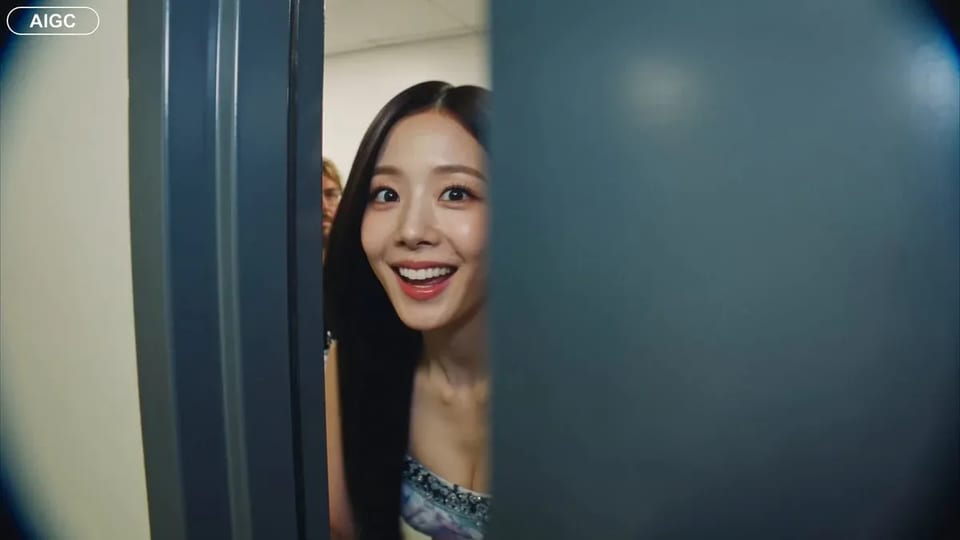
Handheld backstage idol vlog sample

CAMERA: Handheld DV 16mm camcorder aesthetic, first-person/selfie POV. CHASE always holds the camera. Natural hand shake, imperfect framing, delayed autofocus, clumsy zooms, occasional face cropping. The camcorder is never visible. LOOK: Soft vintage DV tape quality with slight blur, subtle tape noise, mild highlight bloom, flickering auto-exposure, muted contrast, natural skin tones. STYLE: Bright, playful K-pop idol vlog. Genuine smiles, eye contact, candid energy, quick handheld shots with backstage excitement. CHARACTER: CHASE, Korean female idol in her 20s. Long straight black hair, dewy skin, elegant Korean features, coral lips, large eyes, slim curvy figure. Wearing a stylish stage outfit with subtle glam makeup and sparkly earrings. SETTING: Backstage hallway of a music show studio with dressing room doors, CHASE's name tag on one door, snack table, overhead PA speaker, and blurred staff passing by. SEQUENCE: 1. Selfie: peeks into the hallway. "Hey guys, we're backstage!" 2. Whip pan down the corridor. "This hallway is so long!" 3. Stops at her dressing room, points at her name tag. "That's me!" 4. Close-up of the name tag as she taps it. Ambient audio only. 5. Quick outfit check with a spin near a mirror. "How do I look?" 6. At the snack table, grabs a snack. "Don't mind if I do." 7. Mid-bite, PA announcement interrupts. She laughs: "Wait—" 8. Selfie ending: hears the countdown, waves, makes a hand heart, then runs toward the stage. "That's my cue—see you after the stage!"

CAMERA: Handheld DV 16mm camcorder aesthetic, first-person/selfie POV. CHASE always holds the camera. Natural hand shake, imperfect framing, delayed autofocus, clumsy zooms, occasional face cropping. The camcorder is never visible. LOOK: Soft vintage DV tape quality with slight blur, subtle tape noise, mild highlight bloom, flickering auto-exposure, muted contrast, natural skin tones. STYLE: Bright, playful K-pop idol vlog. Genuine smiles, eye contact, candid energy, quick handheld shots with backstage excitement. CHARACTER: CHASE, Korean female idol in her 20s. Long straight black hair, dewy skin, elegant Korean features, coral lips, large eyes, slim curvy figure. Wearing a stylish stage outfit with subtle glam makeup and sparkly earrings. SETTING: Backstage hallway of a music show studio with dressing room doors, CHASE's name tag on one door, snack table, overhead PA speaker, and blurred staff passing by. SEQUENCE: 1. Selfie: peeks into the hallway. "Hey guys, we're backstage!" 2. Whip pan down the corridor. "This hallway is so long!" 3. Stops at her dressing room, points at her name tag. "That's me!" 4. Close-up of the name tag as she taps it. Ambient audio only. 5. Quick outfit check with a spin near a mirror. "How do I look?" 6. At the snack table, grabs a snack. "Don't mind if I do." 7. Mid-bite, PA announcement interrupts. She laughs: "Wait—" 8. Selfie ending: hears the countdown, waves, makes a hand heart, then runs toward the stage. "That's my cue—see you after the stage!"

Why Run Veo 3 Inside a Multi-Model AI Video Generator

Veo 3 is Google's flagship video model, and it leads on physics, motion coherence and native audio. But one model never covers every shot — Seedance is faster and cheaper for bulk drafts, and image-to-video models turn a single still into a clip. Omni is an AI video generator that keeps Veo 3 one click from Seedance and every other model, so you switch with a dropdown, keep your prompt and reference image, and render the version that fits the brief. Start with Veo 3; reach for the rest without leaving the page.

| veo3 | veo3-fast | seedance-2 | image-to-video | Premium + Standard Credits |

How it works

Run the AI Video Generator in Three Steps

From a blank prompt to a downloadable clip — no setup, no separate Google account, no per-model billing.

  1. 1

    Pick Veo 3 or another model

    Browse the AI video generator catalog in the dropdown — Veo 3, Veo 3 Fast, Seedance and more, each with a credit badge and a short description. Switching is one click; your prompt and reference image stay loaded.

  2. 2

    Write a prompt or drop a still

    Describe the shot in plain language for text-to-video, or upload a still and let the AI video generator animate it. Most models accept a reference image up to 10 MB and a resolution and duration choice per run.

  3. 3

    Run, preview, download

    Hit generate and the AI video generator renders in the background — most clips finish in minutes. Failed runs refund credits automatically. Outputs include a commercial-use license on paid plans.

Who Uses This AI Video Generator

Different shots reach for different models — Omni lets each user pick the right AI video generator without leaving the page.

  • Veo 3 Users

    People who want Veo 3 for its native audio and motion run it next to faster models for drafts. With Omni they prototype on Seedance, then render the hero shot on Veo 3 — same prompt, one workspace, no second subscription.

  • Content Creators

    Creators turn a thumbnail still into a moving intro with image-to-video, then generate B-roll with the AI video generator best at the look they want. The picker keeps the prompt, so iterating across models is friction-free.

  • Marketers

    Marketing teams test a product spot across Veo 3 and Seedance to balance quality against credit cost. Same prompt, multiple models, side-by-side clips — picking the version that ships takes one session, not a week.

  • Filmmakers

    Indie filmmakers storyboard scenes with the AI video generator, animate concept stills with image-to-video, and reserve Veo 3 for the shots that need physical realism. One workspace covers previz to hero render.

What's included

Everything an AI Video Generator Should Ship With

  • Veo 3 in the picker

    Google's Veo 3 and Veo 3 Fast sit in the same AI video generator picker as Seedance and every other model — kept current as new versions ship, never a stale snapshot.

  • Image-to-video built in

    Every i2v-capable model in the AI video generator accepts a still: animate a product shot, extend a frame, or turn a generated image into a clip without leaving the workspace.

  • Premium and standard credits

    Free credits on signup, refreshable via daily check-in. Use them on standard video models; Premium models use subscription or purchased credits.

  • Native audio where the model supports it

    Veo 3 generates synced sound with the picture. The AI video generator surfaces which models output audio so you pick the right one for dialogue, ambience, or silent B-roll.

  • Commercial-use license on paid plans

    Outputs from every model in the AI video generator ship with commercial-use rights on paid plans. The legal page lists exact terms.

  • Automatic refunds on failed runs

    Server errors, model timeouts, content filters — any AI video generator run that fails refunds your credits automatically. You only pay for clips you keep.

Frequently Asked Questions About the AI Video Generator

Is this AI video generator free?

Yes — new accounts get free credits on signup for standard models and tools. Free credits refresh through daily check-in and referral; Premium models use subscription or purchased credits, and paid plans start when you need more volume, longer clips, or commercial-license outputs.

Is Veo 3 included, and do I need a Google account?

Veo 3 and Veo 3 Fast are included in the Omni picker — no separate Google account or billing required. Sign up once with email, get free credits, and run the AI video generator across Veo 3, Seedance and every other model from one workspace.

Which video model should I pick?

It depends on the shot. Veo 3 leads on physical realism, motion and native audio. Veo 3 Fast and Seedance are quicker and cheaper for drafts and bulk variations. Image-to-video models animate a still. The picker shows badges and descriptions so you can choose without leaving the workspace.

Can the AI video generator turn an image into a video?

Yes — image-to-video models in the picker animate a still you upload. Drop a product shot or a generated image, describe the motion, and the AI video generator renders a clip. Switch models freely; the reference image carries across switches.

How long does a generation take?

Most clips render in minutes, depending on the model, resolution, and duration. Runs are queued in the background so the AI video generator workspace stays responsive — start another job or edit a prompt while one renders.

Can I use the AI video generator outputs commercially?

Yes — outputs from every model in the workspace ship with a commercial-use license on paid plans. The legal page lists exact terms.

Open the AI Video Generator Workspace

Free credits on signup, Veo 3 and every leading model under one prompt, commercial-use outputs on paid plans.